
Introduction
Amazon S3 supports byte range fetches, allowing us to retrieve specific portions of an object rather than the entire file. This can be particularly useful for large files, enabling efficient data retrieval and reducing bandwidth usage, and this technique is commonly used in scenarios like video streaming, partial downloads, and resuming interrupted transfers when dealing with large objects.
How S3 Stores Files
Before diving into byte-range fetches, it’s important to understand how Amazon S3 stores data unlike traditional file systems that use directories and subdirectories, S3 operates with a flat structure where everything is stored as objects. Each object is identified by a unique key, which can include path-like patterns to give the illusion of folders but these do not represent real directories.
Behind the scenes S3 may distribute the data across multiple storage systems to ensure high durability and performance, but this is completely transparent to the user.
Fetch the First Bytes of an Object
Using byte range fetches is simple we just need to tell S3 the range of bytes we want to fetch via the range header in the GET request and S3 will return only the specified portion of the object.
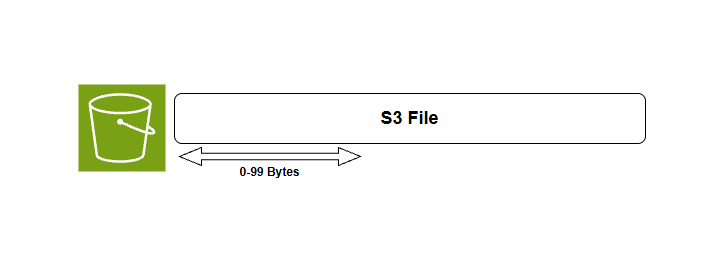
Byte range fetch example
Fetching the first bytes of an object is useful for preview content without downloading the entire file. If you need object metadata such as size, content type, or custom metadata we can use HeadObjectCommand instead of a range request.
To better understand this concept let's see how to fetch a byte range from an my bucket named doodooti and a file named TestFile.pdf.
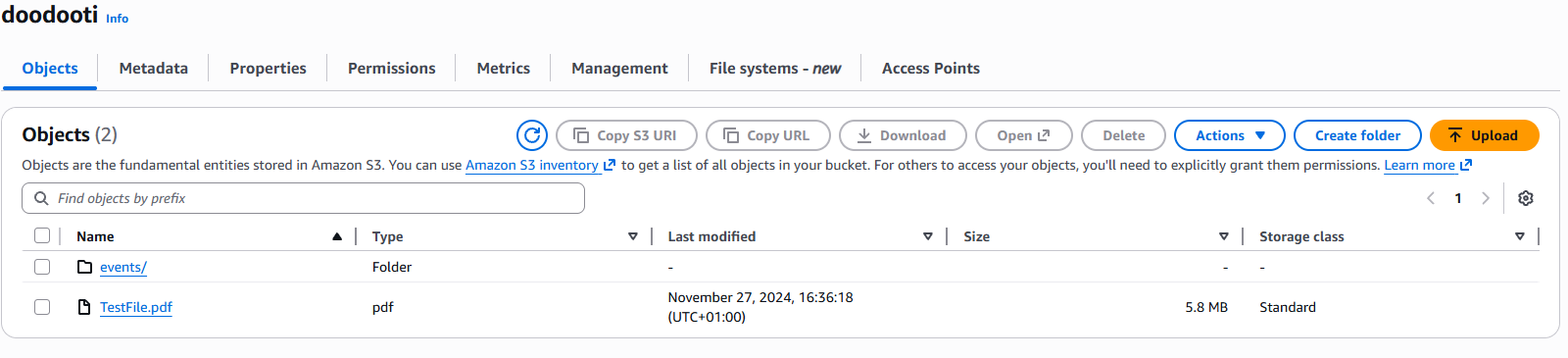
File with 5Mb size
To fetch the first bytes of the file, i will use the s3-client package which provides a convenient interface for interacting with S3 as the code snippet below shows:
import { S3Client, GetObjectCommand, HeadObjectCommand } from "@aws-sdk/client-s3";

const client = new S3Client({ region: "eu-central-1" });

const main = async () => {
    const response = await client.send(new GetObjectCommand({
        Bucket: "doodooti",
        Key: "TestFile.pdf",
        Range: "bytes=0-499",
    }));

    const bodyText = await response.Body.transformToString();
    console.log(bodyText);
}

main().then(() => console.log("Done")).catch((error) => console.error("Error:", error));
Because we dealing with a PDF file the output will be the first 500 bytes of the file which contains the PDF header and some metadata about the file:

Byte range fetch response
Fetching in parallel
For large files we can fetch different byte ranges in parallel to speed up the retrieval process and this is especially beneficial when wee need to download a large file in chunks or when we want to process different parts of a file simultaneously.
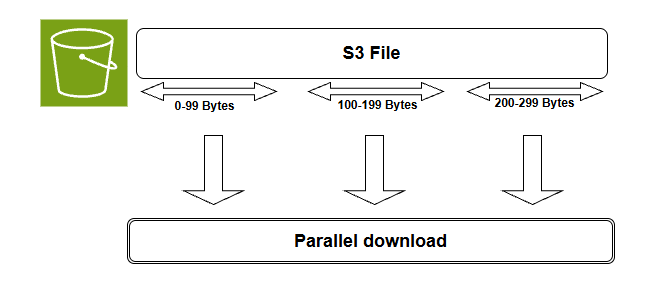
Parallel byte range fetch
In order to fetch our file that we used in the previous example in parallel we can divide it into 5Mb chunks and fetch each chunk separately using byte range fetches and then we can combine the results to reconstruct the original file, so let's start first by defining a function that calculates the byte ranges for a given file size and chunk size:
const getByteRanges = (fileSize: number, chunkSize: number) =>
    Array.from({ length: Math.ceil(fileSize / chunkSize) }, (_, i) => ({
        start: i * chunkSize,
        end: Math.min((i + 1) * chunkSize - 1, fileSize - 1),
    }));
Then we define a function that fetches a specific byte range as a chunk from the S3 object:
const downloadChunk = async (start: number, end: number): Promise<Buffer> => {
    const response = await client.send(new GetObjectCommand({
        Bucket: bucket,
        Key: key,
        Range: `bytes=${start}-${end}`,
    }));
    return Buffer.from(await response.Body!.transformToByteArray());
};
The next step is to get the file size and use it to calculate the byte ranges:
 const { ContentLength } = await client.send(new HeadObjectCommand({ Bucket: bucket, Key: key }));
const fileSize = ContentLength!;Finally, we can fetch the chunks in parallel and combine them to reconstruct the original file:
const chunkSize = 1024 * 1024; // 1 MB per chunk
const bucket = "doodooti";
const key = "TestFile.pdf";

// Build chunk ranges
const chunks = getByteRanges(fileSize, chunkSize);

console.log(`Downloading ${chunks.length} chunks in parallel...`);

// Download all chunks in parallel
const buffers = await Promise.all(chunks.map(({ start, end }) => downloadChunk(start, end)));

const finalBuffer = Buffer.concat(buffers);
console.log(`Downloaded ${finalBuffer.length} bytes`);
Parallel byte range fetch response
To convert the final buffer to a readable pdf fidle we can use the following code:
 import { writeFile } from "fs/promises";

 await writeFile("output.pdf", finalBuffer);
Fetching byte ranges in parallel dramatically cuts download time for large S3 files especially over high-latency networks. Instead of waiting for one giant sequential download chunks arrive simultaneously and are reassembled in order. This is ideal when we only need specific parts of a file, and if a single chunk fails we can retry just that piece rather than starting over from scratch.
Comparison
There are three main approaches to fetching data from S3: full download, byte-range fetchand parallel range fetch, each method has its own use cases, advantages, and tradeoffs as shown in the table below:
| Approach | When to Use | Pros | Tradeoffs |
|---|---|---|---|
| Full download | Small files or simple one-time access | Simple to implement | Higher bandwidth usage and slower for large objects |
| Byte-range fetch | Previewing or reading a specific section | Less data transfer and faster access to partial content | Requires knowing the byte offsets |
| Parallel range fetch | Large files that can be split into chunks | Faster download time and better throughput | More complex and needs chunk management |
Conclusion
With S3 byte range fetches we only grab the parts of a file we actually need, which keeps our bandwidth in check and makes resuming downloads or previewing content effortless and adding parallel fetching into the mix takes it to the next level, especially for large files where the speed gains become hard to ignore