
Introduction
Node.js is our favorite tool for building quick, powerful backend systems. It's really good at handling tons of user connections at once because of how it processes tasks in the background. But here's the thing being flexible doesn't mean being careless. Keeping Node.js apps secure isn't as easy as adding a couple of safety features and calling it a day. It's something you need to work on constantly, protecting your app at every level.
Securing Dependencies
One of the first things we need to do is keep an eye on the third-party packages we use. Each package brings functionality, but also potential vulnerabilities. Running npm audit regularly helps us detect known issues
npm audit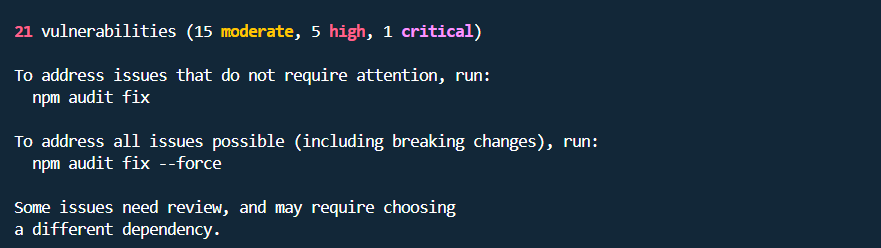
Example of running the npm audit
To fix vulnerabilities appear we first need to try fixing them with:
npm audit fixRunning npm audit fix won't solve all our security problems. It only fixes issues where there's a safe update available that won't break our code. It handles vulnerabilities in our main packages when newer, secure versions exist. But it can't do anything about problems that don't have fixes yet, or situations where updating would mess up our application.
When npm audit fix leaves issues behind, we can try npm audit fix --force, but this might cause problems, so we need to be careful. Sometimes we'll need to manually update specific packages or switch to better alternatives. The reality is that some vulnerabilities just don't have solutions yet. Before panicking, we should run npm audit to see what the actual problems are. Not every security warning is critical for our project, so we focus on what actually matters.
Environment Hardening for APIs
API security depends heavily on the environment. We always need to run Node.js under a dedicated non-root user. Secrets such as API keys, JWT secrets or database credentials are stored in environment variables instead of hardcoding them.
const dbPassword = process.env.DB_PASSWORDConnecting to a database safely might look like this:
import { Client } from 'pg';

const client = new Client({
  user: process.env.DB_USER,
  host: process.env.DB_HOST,
  password: process.env.DB_PASSWORD,
  database: process.env.DB_NAME,
  port: process.env.DB_PORT
});

await client.connect();
For HTTP security, we rely on helmet to protect headers and reduce common attack vectors like XSS, clickjackingor MIME sniffing :
import helmet from 'helmet';
import express from 'express';

const app = express();
app.use(helmet());
Helmet is a security middleware specifically designed for Express.js that helps protect our application by setting various HTTP headers automatically. It acts as a shield that prevents common web vulnerabilities.
If we're using other Node.js frameworks like Koa or Fastify they have their own similar security tools.
However, Helmet isn't a complete security solution on its own. We still need to validate user inputs and sanitize data to fully protect our application.
Input Validation and Sanitization
APIs receive user input from multiple sources like query parameters, JSON payloads or headers. We can never trust this input because users might send malicious data either accidentally or intentionally. That's why validating and sanitizing every piece of input is critical to keeping our application safe.
Libraries like Joi or zod make schema validation simple and clean. For example, if we're building a user registration endpoint we can use these tools to ensure the email is valid the password meets our requirements and no unexpected fields sneak through. Instead of writing dozens of if statements to check each field these libraries let us define rules once and apply them automatically to all incoming data.
const userSchema = Joi.object({
  email: Joi.string().email().required(),
  password: Joi.string().min(8).required(),
  age: Joi.number().min(18).required()
});

app.post('/register', (req, res) => {
  const { error, value } = userSchema.validate(req.body)

  if (error) {
    return res.status(400).json({ error: error.details })
  }

  // Safe to use validated data
  const user = value;
});
For database operations we need to use parameterized queries or ORM methods:
const query = 'SELECT * FROM users WHERE email=$1 AND password=$2'
const result = await client.query(query, [email, password])
We also need to sanitize output to prevent XSS attacks especially in APIs that return HTML content or are consumed by web clients
import escapeHtml from 'escape-html'

res.send({ comment: escapeHtml(userComment) })
Authentication and Authorization
APIs are attractive targets for attackers trying to access data or resources. We never store passwords in plaintext and hash them using bcrypt
import bcrypt from 'bcrypt'

const hashedPassword = await bcrypt.hash(password, 10)
JWTs (JSON Web Tokens) have become one of the most popular methods for API authentication. They allow us to verify users without constantly querying the database, making our application faster and more scalable. Instead of storing session data on the server we issue a signed token to the user that contains their identity information and they send it back with each request
import jwt from 'jsonwebtoken'

const token = jwt.sign({ userId: user.id }, process.env.JWT_SECRET, { expiresIn: '15m' })
res.json({ token })
Rate limiting protects our APIs from abuse by restricting how many requests a user can make within a specific time window. Without it attackers can flood our server with thousands of requests, causing it to crash or slow down. We can implement rate limiting easily using libraries like express-rate-limit which automatically block users who exceed the limit
import rateLimit from 'express-rate-limit'

const apiLimiter = rateLimit({
  windowMs: 15 * 60 * 1000,
  max: 100,
  message: 'Too many requests please try again later.'
});

app.use('/api/', apiLimiter)
Runtime Hardening for APIs
APIs often deal with dynamic payloads or JSON data. Dynamic code execution is risky so avoid eval() or dynamically importing untrusted scripts.
Also try to limit resources to prevent denial-of-service attacks. Using Docker we can set memory and CPU limits:
docker run -m 512m my-node-apiIn Express we handle errors without leaking stack traces:
app.use((err, req, res, next) => {
  console.error(err)
  res.status(500).json({ message: 'Internal Server Error' })
});
Monitoring and Logging API Activity
Even hardened APIs need monitoring. We track requests, login attempts and API errors using logging frameworks like winston
import winston from 'winston'

const logger = winston.createLogger({
  level: 'info',
  transports: [
    new winston.transports.Console(),
    new winston.transports.File({ filename: 'api.log' })
  ]
});

logger.info('API request received', { path: req.path, method: req.method })
Centralized logging and alerts allow us to detect anomalies such as repeated failed login attempts, abnormal request patterns or spikes in traffic.
Content Security Policy
For high-security APIs, we take additional measures to protect our users. One powerful tool is Content Security Policy (CSP). It acts like a security guard for the browser and tells it exactly which sources are allowed to load scripts and images from.
app.use(
  helmet.contentSecurityPolicy({
    directives: {
      defaultSrc: ["'self'"],
      scriptSrc: ["'self'", 'trusted.cdn.com']
    }
  })
);
If an attacker somehow injects malicious code into our application, the browser will refuse to run it because it's not from an approved source. This adds an extra layer of defense that protects our users even if other security measures fail.
Conclusion
Building secure Node.js APIs requires diligence at every layer. From managing dependencies, hardening the environment, validating input, enforcing authentication, controlling runtime behavior to continuous monitoring and in the end security is a mindset we need to adopt across our team.